From LinkedIn Comment to Meeting: How to Follow Up Without Being Awkward

The awkward part is rarely the comment. It is the DM that arrives twenty minutes later: “Loved your post. Would you be open to a quick call about our platform?”
You were just in their thread as a peer. Now you are in their inbox as a pitch. That jump is why social selling follow-up feels icky.
A LinkedIn comment to meeting path is slower than a CRM sequence, and that is the point. Public first. Wait. Then a specific DM that could only follow that thread. No connect-and-pitch.
Let’s break it down.
Why the comment is not the meeting yet
A good comment does two jobs. It adds something the author (and their audience) can use. It puts your name in a feed your buyer already chose to read.
LinkedIn’s Social Selling Index still splits that work: engaging with insights in public, and building relationships over time. Comments feed the first. A meeting lives in the second. Collapsing both into one DM is how follow-up gets weird.
LinkedIn’s Professional Community Policies also draw a line at untargeted or obviously unwanted messages. A calendar link after a single “great point” is the inbox version of that.
For what the public line should contain, see How to Maximize LinkedIn Engagement with Targeted Comments: A SocialSense Case Study. If the comment could sit under any post, the DM will feel like a script too.
Public comment, then wait, then a specific DM
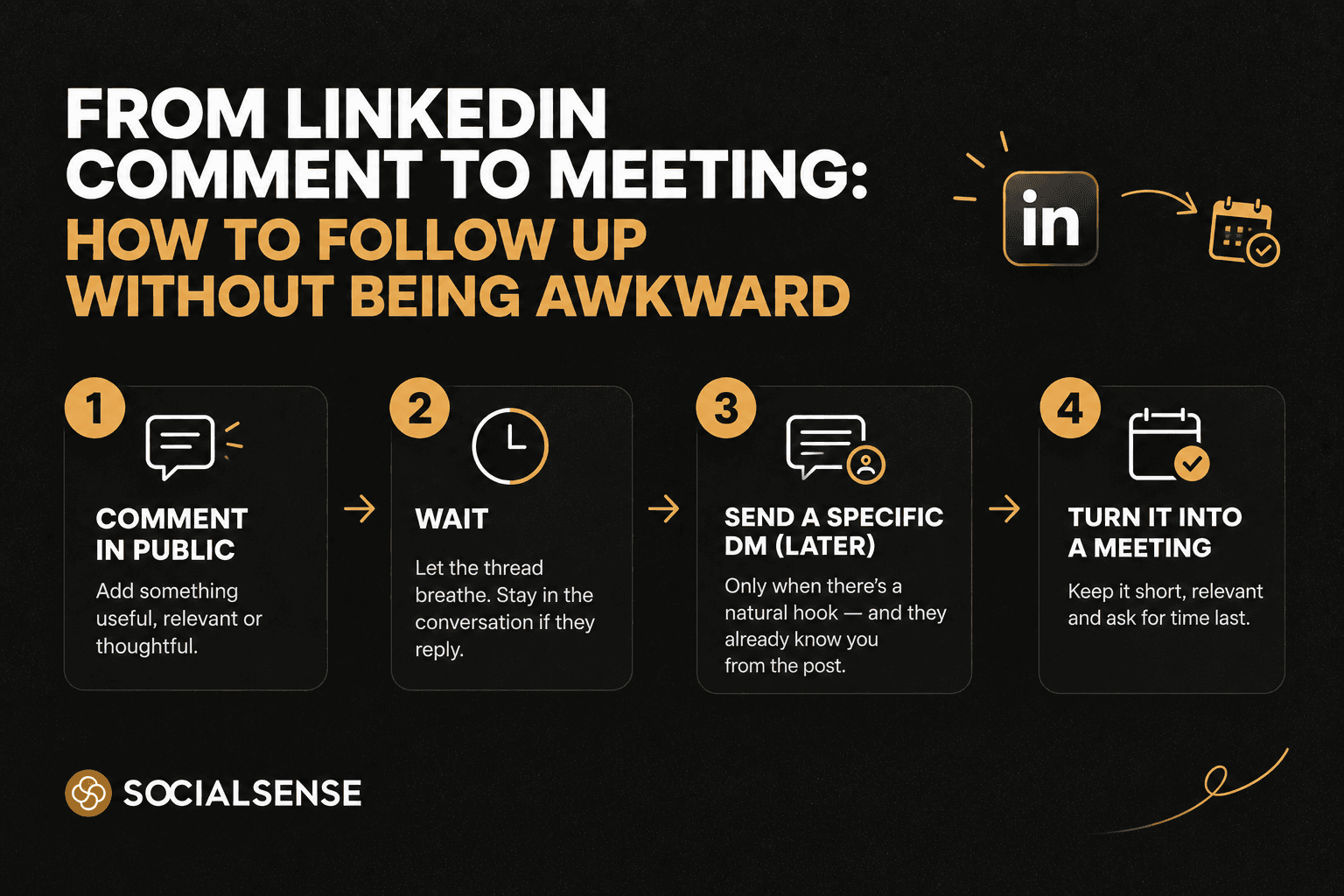
Treat the path as three beats, not one burst.
Comment in public. Name one claim, example, or question from their post.
Wait. Stay in the comments if they reply. Do not slide into DMs the same hour unless they invited a deeper take.
DM only when there is a hook too long for the thread—and they already know your name from that post.
Weak DM (same day, no thread): “Hey Maya, saw your post on churn. We help SaaS teams cut it in half. Free for a 15-min chat this week?”
Better DM (after they replied, or a day or two later): “Maya—your point on activation vs logos stuck with me. We keep seeing the same split on calls. Curious how you’re measuring time-to-value for mid-market vs enterprise. No pitch—just that thread.”
The second note can only exist because the comment existed. That is how you turn comments into conversations instead of using the post as a pretext.
Move a LinkedIn comment to a DM when they replied in public and the next sentence is long or operational, or when they asked something you cannot answer in two lines. If you are not connected yet, send a connection note that names the thread—not a product paragraph. The meeting ask still waits.
Do not move it when they never acknowledged the comment, when your only move is a demo link, or when you are following up on a like. A LinkedIn DM after a comment is a continuation. If there is nothing to continue, stay in public.
Stay visible without hovering on their profile
Awkward follow-up often comes from famine, then a binge. You ignore someone for three weeks, then one comment plus an instant DM. To them, you appeared out of nowhere with an agenda.
The warmer version is a short list of people whose posts you actually read, at a pace you could explain to a customer. That is where SocialSense Auto Engagement fits. It likes and comments on posts from people you pick—not a random feed—with a daily cap, a tone you set, and a log you can undo. Sales and GTM teams use it so prospects keep seeing your name between outreach touches. The later DM is then not the first time you showed up.
It does not replace a human sentence when the thread is hot. If Auto Engagement drafted or placed a comment, read it the way you would read a note going to a champion. Generic volume still looks like a quota.
Picking who belongs on that list is half the job. How to Track and Engage Key Connections on LinkedIn for Better Networking with SocialSense is the companion for not treating the whole graph as equally worth a DM.
Use activity timelines, not a pitch calendar
Connect-and-pitch fails because the calendar is yours (end of quarter) and the context is missing. Social selling follow-up should follow their activity, not your sequence date.
In SocialSense, Track Contact / Leads + Contact Insights is built for that: a timeline of what they posted, a short summary so you do not invent their job, insights on how they show up, and an icebreaker when the timing is right. Open the timeline after a useful public exchange. If they just wrote about implementation ownership, your DM can live on that sentence. If they went quiet, wait.
Icebreakers belong after there is a reason to talk privately—starter, not send button. Edit anything that sounds like “noticed we both work in SaaS.”
LinkedIn’s SSI explainer still describes the index as brand, the right people, insights, and relationships. Timelines help the last two without turning every like into a meeting invite. For the habit view of the score, see How to Improve Your LinkedIn SSI Score: The Complete 2026 Guide.
Stage | What you do | What you do not do |
Their post goes live | Comment with one specific add | Pitch in the comments |
They reply (or don’t) | Stay in the thread if they engage | DM the same hour with a calendar link |
You are connected + there is a hook | Short DM that only makes sense after that post | Paste a sequence from your CRM |
They reply in DMs | Answer the question; offer a resource if they ask | Jump to a 30-minute demo by default |
They go quiet | Back to their next public post | “Just circling back” three times |
How to write the DM so it does not feel like a trap
Keep it to a few sentences. Reference the exact exchange. End with a question they can answer without booking time.
Weak: “Would love to show you how we do this for teams like yours. Here’s my Calendly.”
Better: “Your reply on ownership before legal gets involved is the pattern we see in late-stage deals. Are you mapping implementation owners in discovery, or only after paper process starts?”
If they want a meeting, they will often ask what you have seen. That is when a short example is earned.
Voice still matters in the inbox. If a tool drafts the icebreaker, add one field detail. AI LinkedIn Assistant: How Sales Teams Can Build Personal Brand Without Losing Their Voice is the longer version of drafts versus a fake version of you.
Frequently Asked Questions
How do I follow up after commenting on LinkedIn? Reply in the thread if they respond. If the next thought is too long for public, and they already know you from that post, send a short DM that names the exact point. If they never replied, comment later on a new post.
When should I move a LinkedIn comment to a DM? When there is a specific continuation and the public exchange already happened—or they invited it. Not as a reward for commenting.
Should I connect first or DM first? If you are not connected, the DM may not land. Send a connection note that cites the comment thread, then wait until they accept. The meeting ask is still later.
Can Auto Engagement replace this follow-up? No. Auto Engagement helps you stay visible on a shortlist with likes and comments you control. The DM and the meeting still need a human who read the thread. Use the activity log so you know what already went out under your name.
How soon is too soon? Same-hour pitch DMs feel like a hunt. A day or two after a real back-and-forth, or after their next post if the first comment sat unread, is usually enough air.
Final thoughts: continue the thread, don’t hijack it
A LinkedIn comment to meeting is not a clever funnel. It is the same conversation, moved private only when that is kinder to the thread and clearer for them.
Stay in public long enough to be useful. Use Auto Engagement so you do not disappear between touches. Use contact timelines so the DM matches what they actually said. Ask for time last.
If the message would make you wince if they screenshot it, it is still a pitch. Rewrite it.
TL;DR
Turn comments into conversations in public first; the meeting is earned, not scheduled from a like.
Comment with one specific add, then wait for a real hook.
Move to a LinkedIn DM after comment only when the next line is too long for the thread.
Do not connect-and-pitch; cite the exact exchange, no calendar in the first note.
Auto Engagement keeps you visible on people you pick, with caps and a log.
Activity timelines pick the moment; icebreakers after they already know you.
For more information, contact SocialSense at contact@socialsense.ai
From LinkedIn Comment to Meeting: How to Follow Up Without Being Awkward

Kaushal Surana

How to Write a LinkedIn Connection Request That Isn’t a Pitch
Kaushal Surana

LinkedIn Auto Engagement for Sales Teams: Stay Visible Without Looking Spammy
Kaushal Surana

How to Write High-Performing LinkedIn Posts
Kaushal Surana
LinkedIn Content Strategy for B2B Growth: A Repeatable System (Not Random Posting)
Kaushal Surana

AI LinkedIn Assistant: How Sales Teams Can Build Personal Brand Without Losing Their Voice
Kaushal Surana