How to Write High-Performing LinkedIn Posts

LinkedIn post writing is not the same skill as writing for Instagram, X, or your company newsletter.
On LinkedIn, you're not just trying to "get attention." You're trying to earn professional trust in a feed full of peers, prospects, recruiters, founders, buyers, and decision-makers. One thoughtful post can start a conversation. A consistent habit can build authority. And over time, that authority tends to turn into inbound leads, partnerships, speaking invitations, job opportunities, and stronger industry visibility.
The good news: you don't need to be a viral creator to write engaging LinkedIn posts. You need a clear point of view, a repeatable structure, and enough humanity that your posts sound like you — not like a corporate brochure wearing a blazer.
Here's how to write posts people actually stop, read, and respond to.
Why LinkedIn Post Writing Matters More Than Ever
LinkedIn has quietly become a professional discovery engine.
It's still a social network, sure. But for a lot of professionals, it's also where people go to evaluate credibility. Before someone replies to your sales email, considers you for a role, invites you onto a podcast, or shortlists your company, there's a decent chance they'll look at your profile and your last handful of posts first.
And that matters more than most people give it credit for. Research behind LinkedIn and Edelman's Thought Leadership Impact Report has repeatedly found that decision-makers spend real time consuming thought leadership content — and that strong thought leadership can shape vendor shortlists and purchasing decisions before a sales conversation ever starts. Your posts, in other words, aren't just content. They're reputation assets.
LinkedIn audiences behave differently than audiences on other platforms, too. People aren't usually scrolling LinkedIn for dance trends or vacation photos. They're looking for:
Useful insights they can apply at work
Stories that make them feel less alone professionally
Credible perspectives from people with real experience
Industry signals that help them make better decisions
Which is why a strong LinkedIn content strategy is less about posting more and more about becoming known for something specific.
And in the age of AI writing tools, that's becoming even more true. When anyone can generate a decent-sounding post in 30 seconds, the advantage shifts to people who can add firsthand experience, sharper opinions, and specific stories. Generic content is getting cheaper by the month. Authentic insight is getting more valuable at roughly the same rate.
The Foundations of a High-Performing LinkedIn Post
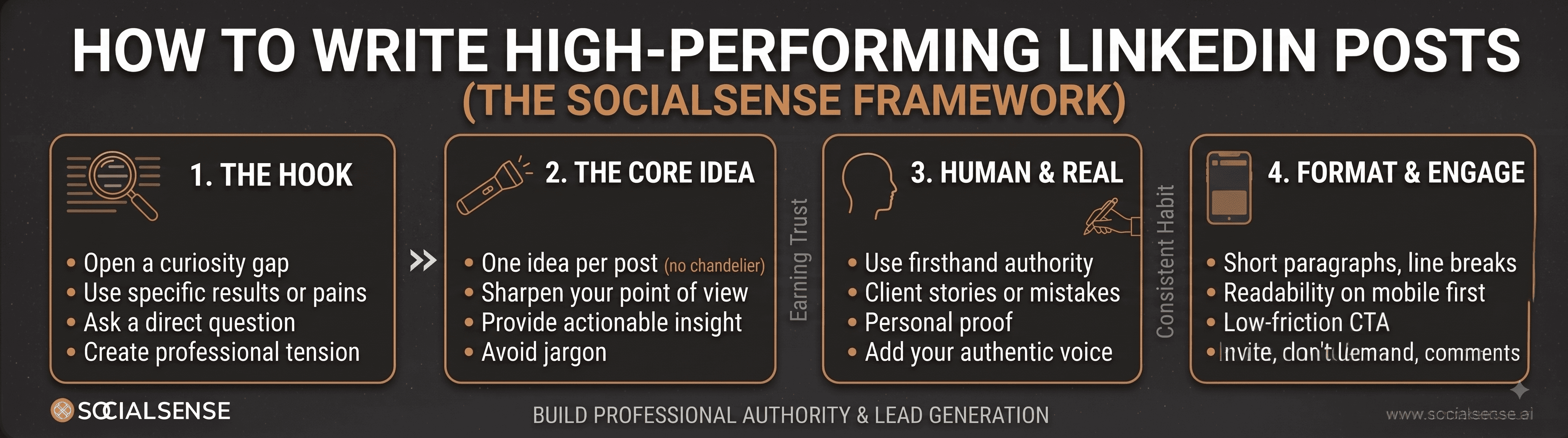
A high-performing LinkedIn post usually has four things working together: a strong hook, one clear idea, a human angle, and an easy-to-read format. Let's take each one in turn.
1. Start with a hook that earns the click
Your first two lines matter more than most people think.
LinkedIn truncates longer posts in the feed, so your opening lines have exactly one job: convince someone to click "see more." Think of them like an email subject line — if they don't create curiosity, tension, or relevance, the rest of the post never gets read.
Weak hook:
"Here are some thoughts on leadership."
Better hook:
"I used to think good leaders had all the answers. Then I managed my first team."
The second version opens a story gap you want closed — that's the whole trick.
A few hook styles worth borrowing:
Contrarian angle: "Most people are using LinkedIn wrong."
Confession: "I deleted a post last week because it sounded nothing like me."
Lesson learned: "After 100 sales calls, I noticed one pattern nobody talks about."
Specific result: "One LinkedIn post brought us 14 qualified conversations. Here's why it worked."
Pain-point opener: "If your LinkedIn posts get impressions but no comments, this may be why."
Specific beats clever, almost every time.
2. Focus on one idea per post
One of the most common mistakes in LinkedIn post writing is trying to say everything at once.
You start with a story about sales. Then a lesson about leadership sneaks in. Then AI gets a mention. Then it ends on a question about productivity. By the end, the reader has no idea what they were supposed to take away.
A good post works more like a flashlight than a chandelier — it points attention in one direction instead of scattering it everywhere at once. Before writing, ask yourself: what's the one thing I want the reader to remember?
Weak focus: "My thoughts on B2B marketing."
Better focus: "Why most B2B content fails before the first sentence."
Sharpest focus: "Your buyer doesn't want more content. They want help making a decision."
That last version gives you an actual post to write.
3. Add a personal touch without oversharing
LinkedIn rewards professional relatability. That doesn't mean turning every post into a diary entry — it means grounding your advice in something real: a client conversation, a mistake you made, a lesson from your team, or a pattern you've noticed in your industry.
Instead of writing:
"Consistency is important for LinkedIn growth."
try:
"For three months, I posted only when I felt inspired. Unsurprisingly, my results were all over the place. When I switched to three focused posts a week around the same theme, people finally started associating me with that topic."
Same lesson, but now it has proof baked into it.
This is also where a tool like SocialSense.ai's PostPilot can help — if you've got scattered ideas sitting in notes, voice memos, call recordings, or internal docs, it can turn that raw material into personalized LinkedIn content that still sounds like you wrote it, because in a real sense, you did.
4. Use visuals when they clarify the idea
Visuals aren't mandatory, but used well, they make a message easier to absorb. Think: a simple framework diagram, a carousel walking through a process, a screenshot with context, a quote card built around a strong line, or a before-and-after example.
The key phrase there is "used well" — a random stock photo of a laptop and coffee mug won't rescue a vague post.
People skim online more than they read. The Nielsen Norman Group has shown for years that users scan rather than read word-for-word, which is exactly why clear formatting and visual hierarchy carry so much weight. LinkedIn is no exception to that pattern.
A simple formula you can reuse
If you're staring at a blank screen, this structure holds up reliably:
Hook → Context → Story or insight → Takeaway → CTA
Hook: Most sales content fails because it sounds like a pitch.
Context: Buyers don't log into LinkedIn hoping to read another product announcement.
Story/Insight: Last month, we rewrote a promotional post as a customer problem breakdown. Same topic. Same offer. Completely different angle. The educational version got 4x more comments.
Takeaway: If you want engagement, lead with the problem your audience recognizes — not the solution you want to sell.
CTA: What's one sales message you're tired of seeing on LinkedIn?
Simple. Useful. Human.
Copywriting Tactics for Maximizing LinkedIn Engagement
Good LinkedIn copywriting isn't manipulation. It's clarity with empathy — you're helping busy people recognize, understand, and act on an idea quickly, which means your writing needs to meet readers where they already are.
Speak directly to pain points
Engaging posts usually name a specific professional tension. Not:
"Marketing is changing."
But:
"Your team is publishing weekly content, but sales still says the leads aren't educated. That's a strategy problem, not a volume problem."
That line lands because it names a real frustration instead of gesturing vaguely at one.
To find pain points, listen for phrases your audience already uses:
"We're posting, but nothing is converting."
"Our founder wants to build a personal brand but has no time."
"Our sales team doesn't know what to say after connecting."
"AI helps us write faster, but everything sounds generic."
Those are post starters hiding in plain sight.
Tell stories with a point
Storytelling works on LinkedIn because people remember scenes better than statements. Not every story earns a place in the feed, though — a good LinkedIn story needs a business-relevant lesson attached. If your story is interesting but doesn't help the reader think differently, it might belong in a group chat instead.
A mini-framework worth using:
Moment: What happened?
Tension: Why did it matter?
Lesson: What did you learn?
Application: How can the reader use it?
"A prospect told me, 'Your competitor explained the problem better.'
That stung.
But they were right. We were explaining features. The competitor was explaining consequences.
Since then, I've believed this: the company that frames the problem best often wins the deal before the demo."
That works because it has a scene, a bit of emotion, and a real takeaway.
Use CTAs that invite, not beg
Please, don't end every post with "Thoughts?" It's not wrong exactly, it's just lazy the fiftieth time you use it.
Better CTAs create a low-friction reason to respond:
"What would you add to this list?"
"Have you seen this pattern in your industry?"
"Which of these mistakes is easiest to make?"
"If you lead a team, how do you handle this?"
"Want the template I use? Comment 'template' and I'll send it over."
The best CTAs feel like a conversation starter, not a demand for engagement.
Format for readability
LinkedIn posts should be easy on the eyes. Use short paragraphs, line breaks, occasional bullets, bold statements where the format supports it, and emojis only if they genuinely match your voice.
One useful rule: read your post on your phone before you publish it. If it looks like a wall of text there, your reader will treat it like one.
Should You Use AI Writing Tools for LinkedIn?
Yes — just not as a replacement for your own judgment.
AI writing tools are genuinely useful for LinkedIn post writing when they're treated as a drafting partner: brainstorming hooks, organizing messy thoughts, repurposing long-form content, generating alternate versions of a post. But AI has one bad habit worth watching for — it tends to make everyone sound vaguely impressive and completely forgettable in the same breath.
Use AI for | Don't rely on AI for |
Brainstorming post angles | Your personal experience |
Creating first drafts | Your point of view |
Rewriting for clarity | Your stories and examples |
Generating hook variations | Your credibility |
Repurposing blogs, podcasts, or notes | Your final voice |
Semrush's guidance on AI and content quality makes a point worth carrying over here: AI can genuinely speed up ideation and outlining, but the content still needs real expertise and a distinct point of view to actually stand out once it's published. That's just as true on LinkedIn as it is anywhere else.
Think of AI as raw material, not a finished product. It can hand you the clay. Shaping it is still on you.
Try prompting it like this:
"Turn this client story into three LinkedIn post angles. Keep the tone practical, concise, and founder-led. Do not invent details."
Then add your real experience, cut the fluff, and sharpen the takeaway yourself.
This is exactly the lane where SocialSense.ai's PostPilot is useful — it can pull from your company information, LinkedIn profile, files, articles, voice notes, and knowledge base to build more personalized first drafts. Analytics, meanwhile, shows you what's actually performing — SSI score, engagement, audience growth, and post-level results — so you're refining based on data instead of guessing.
AI can speed up your workflow considerably. Authenticity is still the moat around it.
Common Mistakes to Avoid When Writing LinkedIn Posts
Sometimes improving your LinkedIn content strategy is less about adding new tactics and more about cutting bad habits. A quick self-audit:
Mistake 1: Being too salesy. If every post is about your product, people tune out fast. Fix: teach around the problem your product solves, and build trust before you ask for attention.
Mistake 2: Writing for "everyone." A post for everyone usually resonates with no one. Fix: write for a specific reader — a VP of Sales, a first-time founder, and a freelance designer are dealing with completely different problems.
Mistake 3: Using jargon as a credibility crutch. Words like "synergy," "disruption," and "end-to-end transformation" tend to make posts weaker, not stronger. Fix: say it plainly. If your reader has to decode the sentence, you've already lost them.
Mistake 4: Posting inconsistently. One strong post is nice; a consistent body of work is what actually builds recognition. Fix: pick 3–5 content themes and rotate through them weekly — lessons learned, industry myths, tactical how-tos, customer insights, personal reflections.
Mistake 5: Ignoring performance data. Writing without analytics is like driving with the dashboard covered. Fix: use LinkedIn's native analytics to track impressions, engagement, and profile activity — LinkedIn has its own guidance on post analytics and performance measurement worth reading once. Over time, the patterns will tell you what your audience actually values, which is usually more useful than what you assumed going in.
For more on understanding these metrics, check out this guide: How to Improve Your LinkedIn SSI Score: The Complete 2026 Guide
Power Up Your LinkedIn Presence
LinkedIn post writing is a skill, and like any skill, it improves with intentional practice.
Start with strong hooks. Focus each post on one idea. Add personal experience. Format for skimming. Use AI writing tools to support the process, but don't let them erase your voice. And stay consistent long enough for people to start associating you with the problems you solve.
You don't need to go viral to win on LinkedIn. You need to become useful, recognizable, and trusted.
Try one formula from this guide in your next post. Watch what happens. Review the data, refine your approach, and keep going.
Your next opportunity may start with a single sentence someone finally stops to read.
TL;DR
Hook readers with a compelling opening — LinkedIn truncates posts, so the first two lines carry the weight.
Focus each post on one clear idea instead of several scattered ones.
Add real personal experience; professional relatability builds trust faster than polish does.
Format for skimming — short paragraphs, line breaks, and visuals only when they clarify something.
Use AI for drafts and clarity, never for your point of view, stories, or final voice.
For more information, contact SocialSense.ai at contact@socialsense.ai

From LinkedIn Comment to Meeting: How to Follow Up Without Being Awkward

Kaushal Surana

How to Write a LinkedIn Connection Request That Isn’t a Pitch
Kaushal Surana

LinkedIn Auto Engagement for Sales Teams: Stay Visible Without Looking Spammy
Kaushal Surana
How to Write High-Performing LinkedIn Posts
Kaushal Surana
LinkedIn Content Strategy for B2B Growth: A Repeatable System (Not Random Posting)
Kaushal Surana

AI LinkedIn Assistant: How Sales Teams Can Build Personal Brand Without Losing Their Voice
Kaushal Surana